

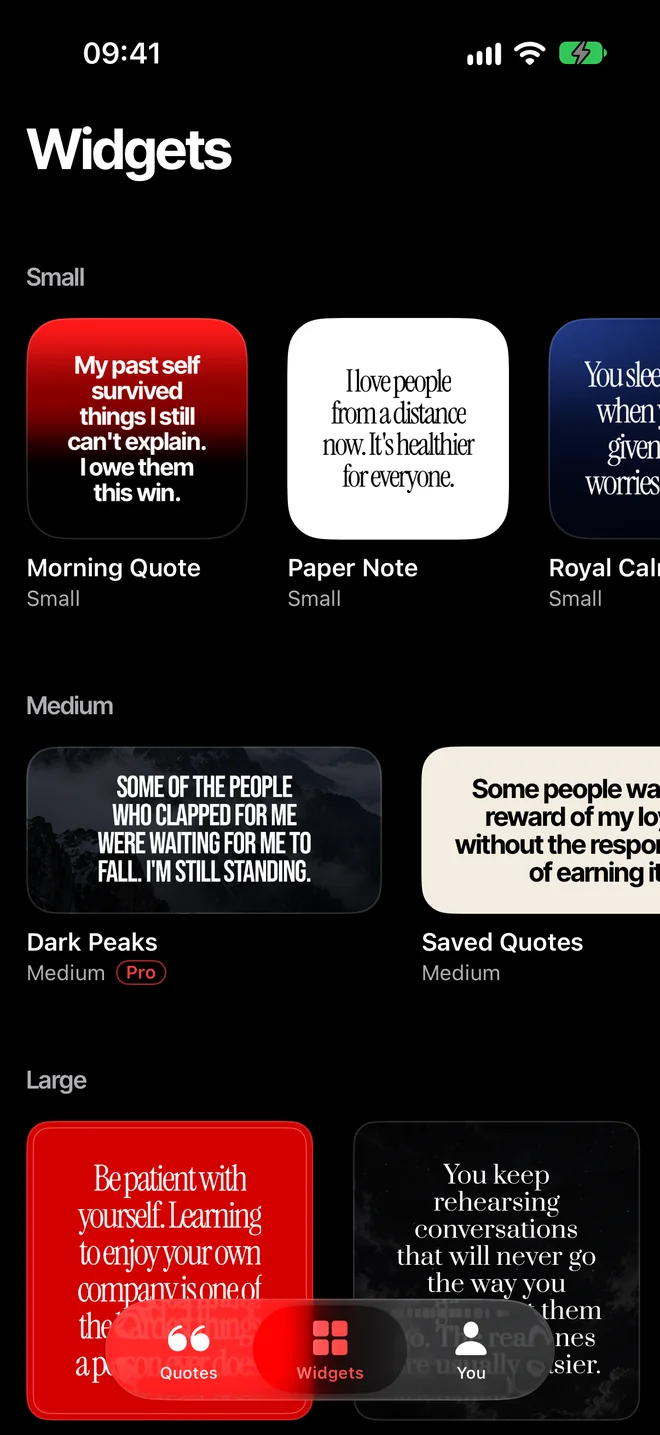
A widget for every spot
KTAMIZEN has small, medium and large widgets for the Home Screen and widgets for the Lock Screen, right under the time. With Pro you also get the Extra Large size on the newest iOS, and as many widgets as you want, each with its own theme and topics.
- Small for one short line between your apps.
- Medium for a full quote across the width of the screen.
- Large when you want the quote to be the first thing you see.
- Lock Screen to read it before you even unlock.
How to add a quote widget to your Home Screen
- Download KTAMIZEN and open it once, so iOS knows about its widgets.
- On your Home Screen, touch and hold an empty spot until the apps start to jiggle.
- Tap Edit at the top left, then Add Widget.
- Search for KTAMIZEN and swipe to pick the size you want.
- Tap Add Widget, drag it where you like and tap Done.
To change the theme or the topics of one widget, touch and hold it and tap Edit Widget.
How to put a quote widget on your Lock Screen
- Touch and hold the Lock Screen until Customize appears, then tap it.
- Choose Lock Screen and tap the row of widgets under the time.
- Find KTAMIZEN in the list and tap the widget to add it.
There are more ways to keep a quote on the Lock Screen, like saving one as your wallpaper. They are all in Quotes on your iPhone Lock Screen.
Choose what it says
Pick the topics you care about, from discipline and self worth to faith, and the widget only shows quotes from those. If you're having a hard day, tell the app how you feel in Right now and every quote follows it until you feel better.
Two widgets speak to you in a different voice: Message from God, a short note written to respect people of any faith, and Your Future Self, a line from the person you're working to become. Both are part of Pro.
Make it look like yours
There are 64 themes, from plain black and white to photos like Red Sea, Black Horse and Golden Hour, and each one comes with a font that suits it. Nine themes are free, Pro opens all of them and 8 more fonts.
Questions
Is the quote widget free?
Yes. KTAMIZEN is free to download and its widgets are free. Pro removes the limits, adds the Extra Large size and opens every theme and font.
Why doesn't my widget change right away?
iOS decides when widgets refresh, so a change can take a few minutes to show. If one stays stuck, remove it and add it again.
Which iPhones does it work on?
Any iPhone with iOS 17 or later. The Extra Large widget needs the newest iOS.
Do I need an account?
No. You open the app and it works. What you choose stays on your iPhone.